How to Fill Up Various Registration Forms Automatically and Easily in any Website ?
Those Who are Browsing Internet Regularly may face the problem of Filling Register Forms when they visit different websites like singing up in Google,Yahoo,Orkut,Facebook,Twitter ...... . You May have to fill First Name, Last Name,Date of Birth,Country like that many have to fill with Patience,
>So I am suggesting You, Don't waste the Time Of Filling Such Forms manually,
>I found a good Software which fill up those forms automatically
"AI ROBO FORM" is a good Software in Filling Various Forms, it also Save your Passwords and fill it automatically with your permission
> After You Installing this Software , You Just Need to Fill up Your Details With You Identity from then it will automatically fills the Registration Forms when such site is opened
Here is the Software for you

How To: Change Your Ip In Less Then 1 Minute?
 How To: Change Your Ip In Less Then 1 Minute
1. Click on "Start" in the bottom left hand corner of screen
2. Click on "Run" ( or simply Press Win+R on keyboard )
3. Type in "command" and hit ok
You should now be at an MSDOS prompt screen.
4. Type "ipconfig /release" just like that, and hit "enter"
5. Type "exit" and leave the prompt
6. Right-click on "Network Places" or "My Network Places" on your desktop.
7. Click on "properties"
You should now be on a screen with something titled "Local Area Connection", or something close to that, and, if you have a network hooked up, all of your other networks.
 8. Right click on "Local Area Connection" and click "properties"
9. Double-click on the "Internet Protocol (TCP/IP)" from the list under the "General" tab
10. Click on "Use the following IP address" under the "General" tab
11. Create an IP address (It doesn't matter what it is. I just type 1 and 2 until i fill the area up).
12. Press "Tab" and it should automatically fill in the "Subnet Mask" section with default numbers.
13. Hit the "Ok" button here
14. Hit the "Ok" button again
You should now be back to the "Local Area Connection" screen.
15. Right-click back on "Local Area Connection" and go to properties again.
16. Go back to the "TCP/IP" settings
17. This time, select "Obtain an IP address automatically"
tongue.gif 18. Hit "Ok"
19. Hit "Ok" again
20. You now have a new IP address
With a little practice, you can easily get this process down to 15 seconds.
NOTE:-
This only changes your dynamic IP address, not your ISP/IP address. If you plan on hacking a website with this trick be extremely careful, because if they try a little, they can trace it back
I think This Post May Help you in many ways, like if you want to download any files from file sharing websites like rapidshare,hotfile,megaupload by appling this trick you can download files as many as you want ( in this sites if you change IP address , they think you are a new user and provide download again )
Please Share your Opinion on this Article through comment box
-Posted by UandiStar.org
Browse Intresting Posts
Mess up your friends pc
Top Tricks for Safe, Smart Downloads
multiple logins with yahoo messenger
ACCESS( USE) YOUR FRIEND COMPUTER FROM UR COMPUETR...
trick to hack a webadress and redirect to our own WEBSITE
Increase internet bandwidth(speed) by tweaking QoS...
Securing your website
Allowing dos and regedit in a restricted Windows
see the ip of all computers you are connected to
Best Free Anonymous Surfing Service
Restricting a Website-very easy
Convert FAT to NTFS file system Easily
Top Tricks for Safe, Smart Downloads
How do you solve hidden files does not appear Afte...
Task Manager has been disabled by your administrat...
Windows Mobile
Check IP at command prompt
Blu-ray (no need of any punk pen drives)
Blu-ray-The Next-Generation Optical Disc( no need ...
Hide Your Partitions ( C , D , E , F) for any 5 t...
How to Speed Up Folder Access
Hiding your folder in a different way!
How to speed up MENU display
Tricks To Set The Search Screen To Classic Look
Trick to Upgrade Windows 98 or Windows Millennium
How to Remove Windows XP's Messenger ?
Speed up BOOSTing by disabling unused ports
Increase Your Internet speed
Speed up BOOSTing by disabling unused ports
Windows Hangs While Saving Your Settings
Windows XP Restarts When You Try to Shut Down Your..
MAKING WINDOWS XP GENUINE THE EASY WAY
see the ip of all computers you are connected to
Connecting to other computers through windows and...
Allowing dos and regedit in a restricted Windows
Making undeletable, unreadable folders
see where ur password stores
Improve the Broadband Speed-new technique for comp...
Chat with your friends through MS-DOS
Windows XP Step-by-Step Installation Instructions
Install Windows XP Professional - New Installation...
XP File Sharing and Permissions
win XP Game Compatibility
Password Recovery Disk
Windows XP and Symmetric Multiprocessing
Custom User Icons
Make XP display a custom screen saver using your v...
Volume Icon in Taskbar
Classic Look Make XP look just like older versions...
Add sound to almost every event in Windows
The Windows XP File Systems
Compatibility Mode Make older programs run in Wind...
Everything You Ever Needed to know about Microsoft...
XP expires
Windows XP support OpenGL
Windows XP and DVD-why microsoft did not include
Windows XP Authentication
Prepare your Hardware
No Java in Windows XP
Microsoft Product Acti...
Display the Quick Launch Bar
Multiuser Features and Advanced Settings
Protect your Identity-wm player
Small Windows XP FAQ-intresting and must know
Add/Remove Optional Windows Components
Change the location of the My Music or My Pictures...
Free back link to us
technology and reviews
Virus removal and its creation -origin of virus
InTeRneT TrICkZZZZ
WinDows TrIcKs
Add Album Art to any Music Folder(or keep your own...
Where has Scan Disk Gone
Internet Broadband speed up
Getting MP3 ripping to work in Windows Media Playe...
Enable Clear Type
Remove shortcut arrow f...
Easy sendto menu modification
Disable Error Reporting
Adjust various visual effects
WinXP Clear Page file o...
Enable / Disable Firewall
Win XP Won’t Completely Shutdown
Reduce Temporary Internet file Space
Change the text in Internet Explorers title bar to...
Remove Shared Documents
XP to directly access WebDAV "internet disks"
How to make My Computer' open in Explore mode with...
How to Write a Windows XP Driver
How to create a boot disk-bootable cd
Music and Audio with XP-sounds new right
How To Enable Hibernation
On Screen Keyboard- open in 1 sec- new trick
Never Re-Activate After Installation
My Computer Won't Shut Down Itself After Installin...
To change drive letters
Licensing Issues
Rename a Series of Files
Troubleshooting and Driver Issues
Burning CDs in Windows XP and the Limitations
How to Use Qfixapp.exe In Windows XP
Install Windows XP Professional - New Installation...
Step by Step Guide to Installing a New Printer in ...
Multibooting with Windows XP - Installing Windows ...
Installing Windows XP with MS-DOS, Windows 95, Win...
Making Sense of the New My Computer Program in Win...
Microsoft Knowledge Base Articles Relating to the ...
Multibooting with Windows XP - Installing Windows ...
What are the differences between using a domain or...
Saving Web Pages with Internet Explorer 6
Make Windows XP Professional Accessible
Mapping Network Drives in Windows XP
Making Older Programs Run under Windows XP
Keeping Windows XP Up-to-Date
Joining a Network
Logging On to Your computer
Make Web Pages Available for Offline Viewing
Playing DVDs in Windows XP
vSharing Your Own Computer's Stuff with the Networ...
Install Windows XP Professional Quick Upgrade
Shutting Down Windows XP
Take your favorite tunes with you transfer music t...
Radio and the Windows Media Player
Turning Off the Licensing Feature in Windows XP
Understanding Microsoft .NET Passport
Understanding My Music in Windows XP
Using Remote Assistance in Windows XP
Using Windows XP Help and Support Center
Error: Installing XP on an Asus UDMA 100 Board.
Do most of my programs from Windows 9* work in Win...
What are the design goals for Windows XP? What doe...
Minimum system requirements
What is the difference between Home and Profession...
Make Use Of Your Windows Key
Step-by-Step Guide to Migrating Files and Settings...
Set up and Use Internet Connection Sharing
-
Make your Folders Private-windows trick
-
NTFS-FAT the better one is ?
-
Ports That Are Used by Windows Product Activation
-
Provide Remote Assistance When Using a NAT Device
-
Remove the Recycle Bin from the Desktop
-
How to Rename the Recycle Bin
-
Restricting Logon Access
-
Easy Search For Hidden Or System Files In Windows ...
-
Set Permissions for Shared Files and Folders
-
no cds crash while writing -Set Processes Priority...
-
Set up and Use Internet Connection Sharing
-
Speed up your browsing of Windows 2000 & XP machin...
-
How to make your Desktop Icons Transparent
-
How to Upgrade Windows 98 or Windows Millennium
-
Upgrading to Windows XP
-
New Sound Blaster Drivers
-
Set the Search Screen to the Classic Look
-
How to Remove Windows XP's Messenger
-
some important tips to keep computer fast and safe...
-
The Computer Continuously Restarts
-
Windows Boots without Warning!
-
Windows Hangs While Saving Your Settings
-
Windows XP Restarts When You Try to Shut Down Your...
-
To trace person who sending you emails-his locati...
-
useful windows trick to speed up computer
-
MAKING WINDOWS XP GENUINE THE EASY WAY
-
Start all your programs with a single click using ...
-
Convert a Guest account into an Admin
-
How to Auto DELETE temporary folder
-
Convert FAT to NTFS file system Easily
-
Top Tricks for Safe, Smart Downloads
-
How do you solve hidden files does not appear Afte...
-
Task Manager has been disabled by your administrat...
-
Data Recovery softwares
-
Precautions and Preventative Measures
-
Other Malicious Programs rather than viruses
-
Types of Viruses
-
What is Viruses, anyway ?
-
Historical background of Virus
-
who is the virus creator
-
Mess up your friends pc
-
The REGISTRY EDITOR is dissable by adminstrator
-
New Yahoo! Messenger Virus Attack
-
How To Remove Orkut MUHAHA Virus
-
Manually Removing PC Viruses!
-
Trojans | Be very careful with them
-
remove amvo.exe Manually
-
manually remove any virus
-
Virus Removal Instructions
-
Virus scan/repair updates
-
Spyware
-
List of computer viruses
-
list of trojan horses
-
Methods of deletion
Use gmail virtual drive to access your files around globe
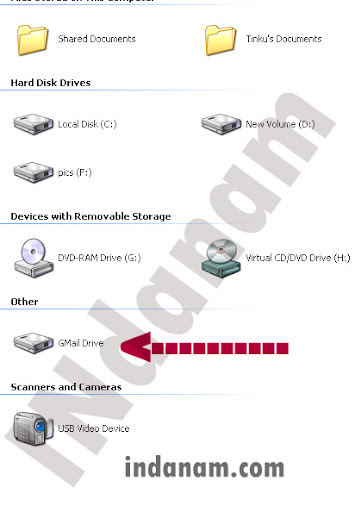

Which appears same as your normal c ,d, e drives and when you save in it, the files will be saved in your Gmail.
Not getting Facebook confirmation code?solution found.
i cant receive Facebook confirmation code?


File transfer in orkut and iGoogle chat

This feature is also compatible with the file transfer functionality in the Google Talk downloadable software, so you can share files directly from the web with folks who use the desktop version.
File transfer is available in orkut and iGoogle only for now. We're working on bringing it to Gmail as well, and we'll keep you posted when that happens!
article taken from orkut blog.Posted by Lizhen Wang, software engineer on orkut blog
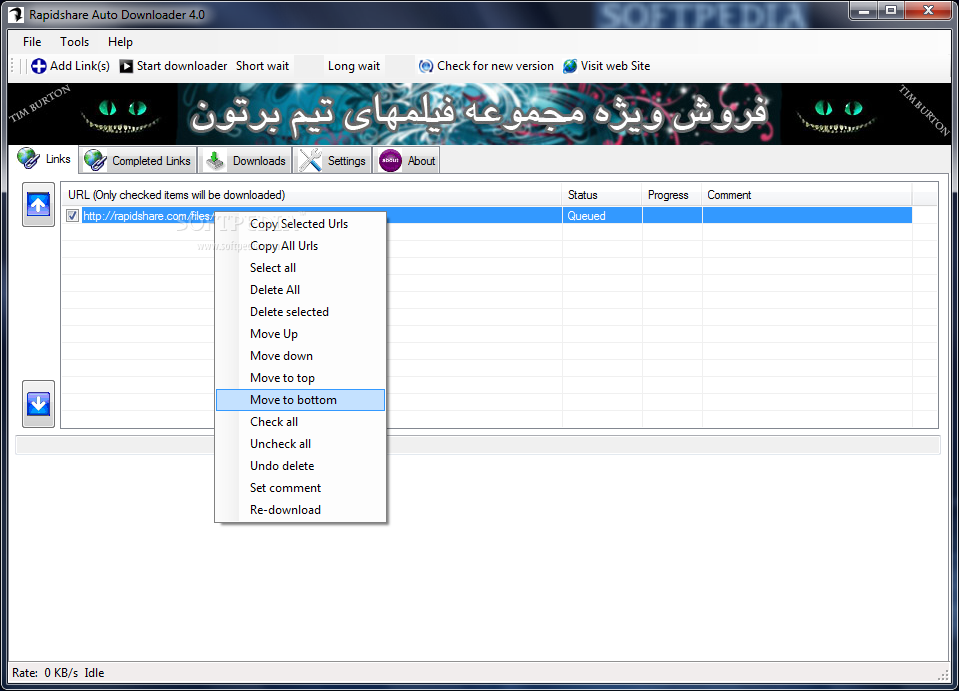
Download Multiple Rapidshare Files at Once
· Download a group of links from rapidshare (one by one).
· Download incomplete downloads until all links are downloaded.
· Autoshutdown feature
· Load and save the download list.
· Check for new versions automatically.
· Support of 3 Languages : English , Farsi , French
2 simple steps to use effective smileys on gtalk

1) Download this Theme (from http://gtalk.anthonysottile.com/)
and sign in to ur gtalk and navigate through gtalk
Top 10 best useful addons for internet explorer 8-IE8

Download
2)Yoono

4 Stars
based on 13 ratings
3)WOT For Internet Explorer

4 Stars
based on 17 ratings
4)Infoaxe - Never forget a Page Again!

5 Stars
based on 9 ratings
5)Radio & MP3 Player

4 Stars
based on 16 ratings
6)YouTube Downloader

based on 13 ratings
7)Wikipedia Visual Search

8)ZoomInto for Internet Explorer

5 Stars
based on 2 ratings
PC Adware Spyware Removal


4 Stars
based on 14 ratings
How to Forward All Email From One GMail Inbox to Another gmail Account
Here we go:-


3)Then select forward a copy of incoming mail to _______________
and enter your new/desired email address in space given
4)now if you want to delete the emails coming to that inbox you have an option below
select delete Gmails copy
5)that's it all your old account emails can be transferred to your new or desired account.
1)select create filter below forwarding option

2)see below picture and enter the specific persons email address

4)that's it all mails from v2tricksz@ymail.com reach to your new / desired gmail account.
How to get serial serial key/crack/keyzen/patch for all most all softwares
How to get serial key/crack/keyzen/patch for all most all softwares
now the below format explains you to
find serial key/crack/keyzen/patch for all most all softwares,cracks,serials,etc
and
helps you learn
Most of the people downloading trial and using it, only after the expiration of trial they try for crack, Serial No, Keygen, Patch....
many of them don't know where to get Serial No, Some websites may infect your system with Trojan horse, Viruses, Ad ware, Spy ware....
So for beginners this is a simply way to find hack with less effort and it saves time to, But make sure you have anti virus activated before trying to get some Serials, Patches to avoid data loss
Just follow the steps as instructed below
1) Go to http://www.google.com
2) type this syntax in search bar " 94FBR"
3) Replace Product name with desired software and leave a space then type 94FBR
4) Press enter, thats it
Now you receive Many pages which contains Serial no, Crack, Patches....
Just make a try, this simple trick works for many people
speed up your pc by using simple software-download for free
*cookies

just use a software called
cc cleaner.
you can find the software for free here
this software is usefull for every computer user.this will surely show u difference.and makes your meachine run like never before.
All Computer KeyBoard ShortKey's
Getting used to using your keyboard exclusively and leaving your mouse behind will make you much more efficient at performing any task on any Windows system. I use the following keyboard shortcuts every day:
Windows key + R = Run menu
This is usually followed by:
cmd = Command Prompt
iexplore + “web address” = Internet Explorer
compmgmt.msc = Computer Management
dhcpmgmt.msc = DHCP Management
dnsmgmt.msc = DNS Management
services.msc = Services
eventvwr = Event Viewer
dsa.msc = Active Directory Users and Computers
dssite.msc = Active Directory Sites and Services
Windows key + E = Explorer
ALT + Tab = Switch between windows
ALT, Space, X = Maximize window
CTRL + Shift + Esc = Task Manager
Windows key + Break = System properties
Windows key + F = Search
Windows key + D = Hide/Display all windows
CTRL + C = copy
CTRL + X = cut
CTRL + V = paste
Also don’t forget about the “Right-click” key next to the right Windows key on your keyboard. Using the arrows and that key can get just about anything done once you’ve opened up any program.
Keyboard Shortcuts
[Alt] and [Esc] Switch between running applications
[Alt] and letter Select menu item by underlined letter
[Ctrl] and [Esc] Open Program Menu
[Ctrl] and [F4] Close active document or group windows (does not work with some applications)
[Alt] and [F4] Quit active application or close current window
[Alt] and [-] Open Control menu for active document
Ctrl] Lft., Rt. arrow Move cursor forward or back one word
Ctrl] Up, Down arrow Move cursor forward or back one paragraph
[F1] Open Help for active application
Windows+M Minimize all open windows
Shift+Windows+M Undo minimize all open windows
Windows+F1 Open Windows Help
Windows+Tab Cycle through the Taskbar buttons
Windows+Break Open the System Properties dialog box
acessability shortcuts
Right SHIFT for eight seconds…….. Switch FilterKeys on and off.
Left ALT +left SHIFT +PRINT SCREEN……. Switch High Contrast on and off.
Left ALT +left SHIFT +NUM LOCK……. Switch MouseKeys on and off.
SHIFT……. five times Switch StickyKeys on and off.
NUM LOCK…… for five seconds Switch ToggleKeys on and off.
explorer shortcuts
END……. Display the bottom of the active window.
HOME……. Display the top of the active window.
NUM LOCK+ASTERISK……. on numeric keypad (*) Display all subfolders under the selected folder.
NUM LOCK+PLUS SIGN……. on numeric keypad (+) Display the contents of the selected folder.
NUM LOCK+MINUS SIGN……. on numeric keypad (-) Collapse the selected folder.
LEFT ARROW…… Collapse current selection if it’s expanded, or select parent folder.
RIGHT ARROW……. Display current selection if it’s collapsed, or select first subfolder.
Type the following commands in your Run Box (Windows Key + R) or Start Run
devmgmt.msc = Device Manager
msinfo32 = System Information
cleanmgr = Disk Cleanup
ntbackup = Backup or Restore Wizard (Windows Backup Utility)
mmc = Microsoft Management Console
excel = Microsoft Excel (If Installed)
msaccess = Microsoft Access (If Installed)
powerpnt = Microsoft PowerPoint (If Installed)
winword = Microsoft Word (If Installed)
frontpg = Microsoft FrontPage (If Installed)
notepad = Notepad
wordpad = WordPad
calc = Calculator
msmsgs = Windows Messenger
mspaint = Microsoft Paint
wmplayer = Windows Media Player
rstrui = System Restore
netscp6 = Netscape 6.x
netscp = Netscape 7.x
netscape = Netscape 4.x
waol = America Online
control = Opens the Control Panel
control printers = Opens the Printers Dialog
internetbrowser
type in u’re adress “google”, then press [Right CTRL] and [Enter]
add www. and .com to word and go to it
Yahoo Warning!!! Verify Your Account now To Avoid It Closed
if any one get this mail ignore it
its a fake email which trying to get your id and password
so ignore this mail
no one will ask this type of questions so be aware ..dont give your yahoo password any where
regards:
vishnu (admin)
SQL Server Proximity Search
George, a good friend of mine created a blog post showing how you can do a SQL Server Zipcode Latitude/Longitude proximity distance search without using the geography data type. I searched the internet to see if anyone had something similar with the geography data type available in 2008 and could not find anything that showed some useful stuff. Yes there is a lot available with geometry and polygons but nothing I was looking for. George challenged me and I did the 2008 version.
There is nothing really complicated. if you run this
DECLARE @g geography;
DECLARE @h geography;
SET @h = geography::STGeomFromText('POINT(-77.36750 38.98390)', 4326);
SET @g = geography::STGeomFromText('POINT(-77.36160 38.85570)', 4326);
SELECT @g.STDistance(@h)/1609.344;
You will see that the distance in miles between those two points is 8.8490611480890067
In the end the code runs between 15 and 60 millisecond to get all the zipcodes within 20 miles of zipcode 10028, pretty impressive if you ask me
All the code including sample data for all the zip codes in the US can be found here
The reason I did not post it here is because George created the 2000 version so it would be weird if the 2008 version was somewhere else, but no worries I will have a post here tomorrow about "what do you wish you knew when you were starting?" Michelle Ufford tagged me so look forward to that
Read this to" know" how much you "dont know"
windows tricks

technology and reviews
- yamaha exclusive feautures
- yamaha yzf pictures-images-wallpapers
- data transfer from humanbody to humanbody
- Bluetooth Intrusion Demystified
- NASA Research Helps Develop New Light Jet Aircraft...
- Bluetooth Headset Reviews
- Apple Wireless Keyboard
- Nokia N96 full specifications
- apple I phone !!!! braak through in technology
- Blu-ray (no need of any punk pen drives)
- Nano-Computers
- ATOM COLLISIONS EXCLUSIVE LIVE REPORT FROM BBC
- WATCH TV ONLINE
- FM is on your GTalk now
- google operating system!
This tricks makes you master of your computer
- Improve the Broadband Speed-new technique for comp...
- Chat with your friends through MS-DOS
- Windows XP Step-by-Step Installation Instructions
- Install Windows XP Professional - New Installation...
- XP File Sharing and Permissions
- win XP Game Compatibility
- Password Recovery Disk
- Windows XP and Symmetric Multiprocessing
- Custom User Icons
- Make XP display a custom screen saver using your v...
- Volume Icon in Taskbar
- Classic Look Make XP look just like older versions...
- Add sound to almost every event in Windows
- The Windows XP File Systems
- Compatibility Mode Make older programs run in Wind...
- Everything You Ever Needed to know about Microsoft...
- XP expires
- Windows XP support OpenGL
- Windows XP and DVD-why microsoft did not include
- Windows XP Authentication
- Prepare your Hardware
- No Java in Windows XP
- Microsoft Product Acti...
- Display the Quick Launch Bar
- Multiuser Features and Advanced Settings
- Protect your Identity-wm player
- Small Windows XP FAQ-intresting and must know
- Add/Remove Optional Windows Components
- Change the location of the My Music or My Pictures...
- Free back link to us-Advertise with us
- HacK 0rkuT Acc0unTs -100% working -tested
- technology and reviews
- Virus removal and its creation -origin of virus
- InTeRneT TrICkZZZZ
- WinDows TrIcKs
- Add Album Art to any Music Folder(or keep your own...
- Where has Scan Disk Gone
- Internet Broadband speed up
- Getting MP3 ripping to work in Windows Media Playe...
- Enable Clear Type
- Remove shortcut arrow f...
- Easy sendto menu modification
- Disable Error Reporting
- Adjust various visual effects
- WinXP Clear Page file o...
- Enable / Disable Firewall
- Win XP Won’t Completely Shutdown
- Reduce Temporary Internet file Space
- Change the text in Internet Explorers title bar to...
- Remove Shared Documents
- XP to directly access WebDAV "internet disks"
- How to make My Computer' open in Explore mode with...
- How to Write a Windows XP Driver
- How to create a boot disk-bootable cd
- Music and Audio with XP-sounds new right
- How To Enable Hibernation
- On Screen Keyboard- open in 1 sec- new trick
- Never Re-Activate After Installation
- My Computer Won't Shut Down Itself After Installin...
- To change drive letters
- Licensing Issues
- Rename a Series of Files
Every thing about ViRuS
- remove amvo.exe Manually [the new virus the new ...
- manually remove any virus
- wat is virus? can u tell ,if no read here
- Virus Removal Instructions
- Viral influx and its consequences
- Virus scan/repair updates
- Why current anti-virus techniques are doomed
- Spyware
- List of computer viruses
- list of trojan horses
- Methods of deletion
- Types of Trojan horse payloads
- GENERAL Virus and Trojan removal Instructions.
- Can Virus be good ?
- Virus Crimes
- Precautions and Preventative Measures
- Famous Case Studies
- Other Malicious Programs rather than viruses
- Types of Viruses
- What is Viruses, anyway ?
- Historical background of Virus
- who is the virus creator
- Mess up your friends pc
- The REGISTRY EDITOR is dissable by adminstrator
- New Yahoo! Messenger Virus Attack
- How To Remove Orkut MUHAHA Virus
- Manually Removing PC Viruses!
- Trojans | Be very careful with them
internet tricks
- To trace originally Email sender
- Download Unlimited from Rapidshare without paying
- Find who is Invisible on Yahoo & also original Id ...
- Multiple Logins of Gmail and Orkut through firefox...
- To trace person who sending you emails-his locati..
- Speed up BOOSTing by disabling unused ports
- unused portsIncrease Your Internet speed
- promptSpeed up BOOSTing by disabling
- Check IP at command
- Windows Mobile
- Mess up your friends pcTop Tricks for Safe, Smart Downloads
- multiple logins with yahoo messenger
- ACCESS( USE) YOUR FRIEND COMPUTER FROM UR COMPUETR...
- trick to hack a webadress and redirect to our own WEBSITE
- Increase internet bandwidth(speed) by tweaking QoS...
- Securing your website
- Allowing dos and regedit in a restricted Windows
- see the ip of all computers you are connected toConnecting to other computers through windows and...
- Best Free Anonymous Surfing Service
- Restricting a Website-very easy
- To trace person who sending you emails-his locatiON
intel computer and reviews