Virtual Router Manager - Make Your Windows 7 System A Wireless Router
Windows 7 includes a little-known new feature called Virtual Wi-Fi, which effectively turns your PC or laptop into a software-based router. Any other Wi-Fi-enabled devices within range - a desktop, laptop, an iPod perhaps - will "see" you as a new network and, once logged on, immediately be able to share your internet connection.
 |
Click on the image to view full image |
- Home
- Office
- School
- Airport
- Bus Station
- The Park
- Grandmas House
- The In-Laws
- Absolutely Anywhere!
How to Install Turbo C++ On 64 bit Windows 7 Operating System
So Many of My Friends and Users Ask Me How to Install Turbo C++ On 64 bit Windows 7 Operating System , So I am giving Step by Step manner with screen shots to understand
better
1. Install the software DOSBox ver 0.73 : download here
2. Create a folder,for example "Turbo" (c:\Turbo\)
3. Download and extract TC into the Turbo folder (c:\Turbo\): download here
4. Run the DOSBox 0.73 from the icon located on the desktop: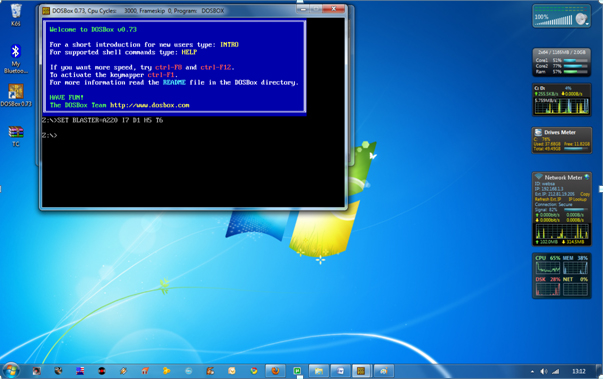
5. Type the following commands at the command prompt [Z]: mount d c:\Turbo\ [The folder TC is present inside the folder Turbo]
Now you should get a message which says: Drive D is mounted as a local directory c:\Turbo\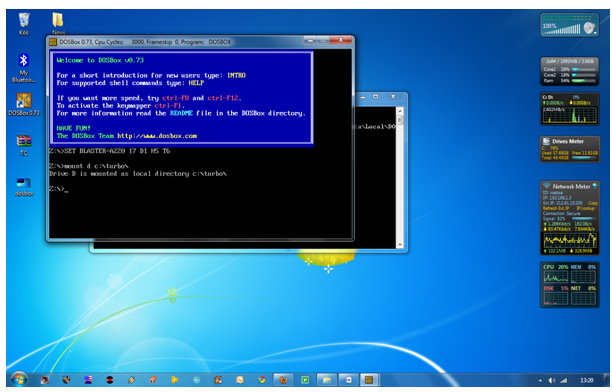
6. Type d: to shift to d: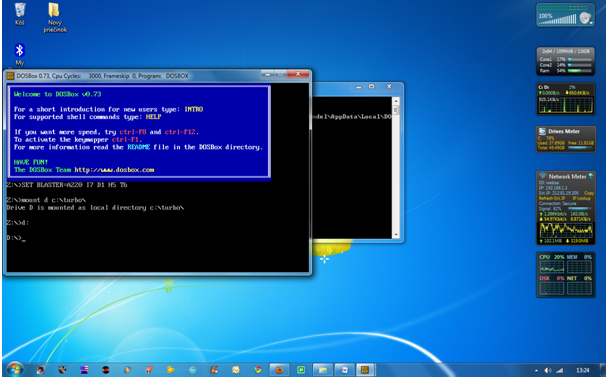
7. Next follow the commands below:
cd tc
cd bin
tc or tc.exe [This starts you the Turbo C++ 3.0]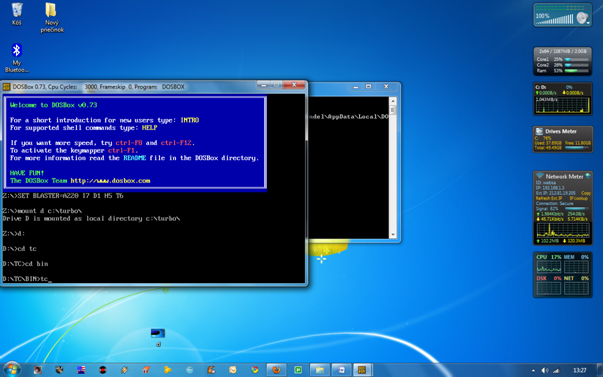
8. In the Turbo C++ goto Options>Directories> Change the source of TC to the source directory [D] ( i.e. virtual D: refers to original c:\Turbo\ . So make the path change to something like D:\TC\include and D:\TC\lib respectively )
How to start TurboC++ in the DOSBox automatically:
You can save yourself some time by having DOSBox automatically mount your folders and start TurboC++:
For DOSBox versions older then 0.73 browse into program installation folder and open the dosbox.conf file in any text editor. For version 0.73 go to Start Menu and click on “Configuration” and then “Edit Configuration“. Then scroll down to the very end, and add the lines which you want to automatically execute when DOSBox starts.
Automatically mount and start Turbo C++3.0 in DOSBox ver 0.73: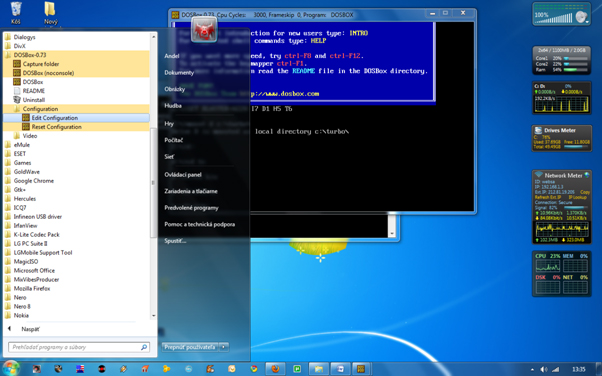
Scroll down to the very end, and add the lines: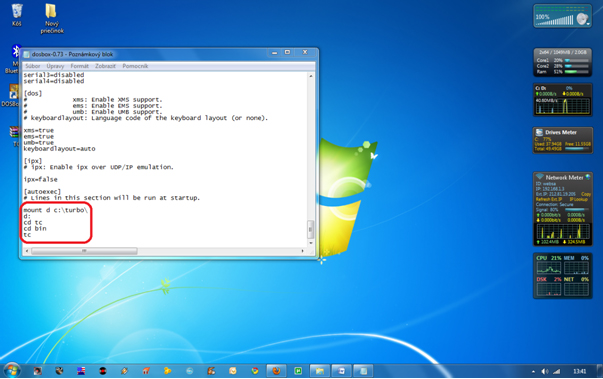
Those commands will be executed automatically when DOSBox starts!
Please note:
Full screen: Alt and Enter
When you exit from the DosBox [precisely when u unmount the virtual drive where Turbo C++ 3.0 has been mounted] all the files you have saved or made changes in Turbo C++ 3.0 will be copied into the source directory(The directory which contains TC folder)
Don’t use shortcut keys to perform operations in TC because they might be a shortcut key for DOSBOX also . Eg : Ctrl+F9 will exit DOSBOX rather running the code .
VIDEO tutorial (there is another setup – original path to Turbo C++ is h:\tc\ and drive H is mounted as drive C:)
Get Video Tutorial @ http://www.uandistar.org/2010/12/how-to-install-turbo-c-on-64-bit.html
Posted By UandiStar.org
How to enable RUN ? if any viruses diabled your RUN, here's the method to enable/disable RUN
This is achieving through the registry open the regedit.exe in your WINDOWS folder, then navigate to the following,
\Explorer]
REGEDIT4 [HKEY_CURRENT_USER\Software\Microsoft\Windows\CurrentVersion\Policies \Explorer] "NoRun"=dword:0 ; 0 to enable |
ECHO REGEDIT4 > Enable-Run.REG echo. >> Enable-Run.reg echo [HKEY_CURRENT_USER\Software\Microsoft\Windows\CurrentVersion\Policies \Explorer] >> Enable-Run.reg echo "NoRun"=dword:0 >> Enable-Run.reg start /w regedit /s Enable-Run.reg |
After running this file , a registry file is created with name "
I am waiting For Ur Comments!!!
-Posted by UandiStar.org
Remove Watermark (Build Info) from Desktop in Windows Vista, 7 and Server 2008 (Both 32-bit and 64-bit) Including All Beta Builds and Service Packs

- Universal Watermark Remover
- Remove Watermark
Universal Watermark Remover
Download Link (Mediafire)
Browse Intresting Posts
Mess up your friends pc
Top Tricks for Safe, Smart Downloads
multiple logins with yahoo messenger
ACCESS( USE) YOUR FRIEND COMPUTER FROM UR COMPUETR...
trick to hack a webadress and redirect to our own WEBSITE
Increase internet bandwidth(speed) by tweaking QoS...
Securing your website
Allowing dos and regedit in a restricted Windows
see the ip of all computers you are connected to
Best Free Anonymous Surfing Service
Restricting a Website-very easy
Convert FAT to NTFS file system Easily
Top Tricks for Safe, Smart Downloads
How do you solve hidden files does not appear Afte...
Task Manager has been disabled by your administrat...
Windows Mobile
Check IP at command prompt
Blu-ray (no need of any punk pen drives)
Blu-ray-The Next-Generation Optical Disc( no need ...
Hide Your Partitions ( C , D , E , F) for any 5 t...
How to Speed Up Folder Access
Hiding your folder in a different way!
How to speed up MENU display
Tricks To Set The Search Screen To Classic Look
Trick to Upgrade Windows 98 or Windows Millennium
How to Remove Windows XP's Messenger ?
Speed up BOOSTing by disabling unused ports
Increase Your Internet speed
Speed up BOOSTing by disabling unused ports
Windows Hangs While Saving Your Settings
Windows XP Restarts When You Try to Shut Down Your..
MAKING WINDOWS XP GENUINE THE EASY WAY
see the ip of all computers you are connected to
Connecting to other computers through windows and...
Allowing dos and regedit in a restricted Windows
Making undeletable, unreadable folders
see where ur password stores
Improve the Broadband Speed-new technique for comp...
Chat with your friends through MS-DOS
Windows XP Step-by-Step Installation Instructions
Install Windows XP Professional - New Installation...
XP File Sharing and Permissions
win XP Game Compatibility
Password Recovery Disk
Windows XP and Symmetric Multiprocessing
Custom User Icons
Make XP display a custom screen saver using your v...
Volume Icon in Taskbar
Classic Look Make XP look just like older versions...
Add sound to almost every event in Windows
The Windows XP File Systems
Compatibility Mode Make older programs run in Wind...
Everything You Ever Needed to know about Microsoft...
XP expires
Windows XP support OpenGL
Windows XP and DVD-why microsoft did not include
Windows XP Authentication
Prepare your Hardware
No Java in Windows XP
Microsoft Product Acti...
Display the Quick Launch Bar
Multiuser Features and Advanced Settings
Protect your Identity-wm player
Small Windows XP FAQ-intresting and must know
Add/Remove Optional Windows Components
Change the location of the My Music or My Pictures...
Free back link to us
technology and reviews
Virus removal and its creation -origin of virus
InTeRneT TrICkZZZZ
WinDows TrIcKs
Add Album Art to any Music Folder(or keep your own...
Where has Scan Disk Gone
Internet Broadband speed up
Getting MP3 ripping to work in Windows Media Playe...
Enable Clear Type
Remove shortcut arrow f...
Easy sendto menu modification
Disable Error Reporting
Adjust various visual effects
WinXP Clear Page file o...
Enable / Disable Firewall
Win XP Won’t Completely Shutdown
Reduce Temporary Internet file Space
Change the text in Internet Explorers title bar to...
Remove Shared Documents
XP to directly access WebDAV "internet disks"
How to make My Computer' open in Explore mode with...
How to Write a Windows XP Driver
How to create a boot disk-bootable cd
Music and Audio with XP-sounds new right
How To Enable Hibernation
On Screen Keyboard- open in 1 sec- new trick
Never Re-Activate After Installation
My Computer Won't Shut Down Itself After Installin...
To change drive letters
Licensing Issues
Rename a Series of Files
Troubleshooting and Driver Issues
Burning CDs in Windows XP and the Limitations
How to Use Qfixapp.exe In Windows XP
Install Windows XP Professional - New Installation...
Step by Step Guide to Installing a New Printer in ...
Multibooting with Windows XP - Installing Windows ...
Installing Windows XP with MS-DOS, Windows 95, Win...
Making Sense of the New My Computer Program in Win...
Microsoft Knowledge Base Articles Relating to the ...
Multibooting with Windows XP - Installing Windows ...
What are the differences between using a domain or...
Saving Web Pages with Internet Explorer 6
Make Windows XP Professional Accessible
Mapping Network Drives in Windows XP
Making Older Programs Run under Windows XP
Keeping Windows XP Up-to-Date
Joining a Network
Logging On to Your computer
Make Web Pages Available for Offline Viewing
Playing DVDs in Windows XP
vSharing Your Own Computer's Stuff with the Networ...
Install Windows XP Professional Quick Upgrade
Shutting Down Windows XP
Take your favorite tunes with you transfer music t...
Radio and the Windows Media Player
Turning Off the Licensing Feature in Windows XP
Understanding Microsoft .NET Passport
Understanding My Music in Windows XP
Using Remote Assistance in Windows XP
Using Windows XP Help and Support Center
Error: Installing XP on an Asus UDMA 100 Board.
Do most of my programs from Windows 9* work in Win...
What are the design goals for Windows XP? What doe...
Minimum system requirements
What is the difference between Home and Profession...
Make Use Of Your Windows Key
Step-by-Step Guide to Migrating Files and Settings...
Set up and Use Internet Connection Sharing
-
Make your Folders Private-windows trick
-
NTFS-FAT the better one is ?
-
Ports That Are Used by Windows Product Activation
-
Provide Remote Assistance When Using a NAT Device
-
Remove the Recycle Bin from the Desktop
-
How to Rename the Recycle Bin
-
Restricting Logon Access
-
Easy Search For Hidden Or System Files In Windows ...
-
Set Permissions for Shared Files and Folders
-
no cds crash while writing -Set Processes Priority...
-
Set up and Use Internet Connection Sharing
-
Speed up your browsing of Windows 2000 & XP machin...
-
How to make your Desktop Icons Transparent
-
How to Upgrade Windows 98 or Windows Millennium
-
Upgrading to Windows XP
-
New Sound Blaster Drivers
-
Set the Search Screen to the Classic Look
-
How to Remove Windows XP's Messenger
-
some important tips to keep computer fast and safe...
-
The Computer Continuously Restarts
-
Windows Boots without Warning!
-
Windows Hangs While Saving Your Settings
-
Windows XP Restarts When You Try to Shut Down Your...
-
To trace person who sending you emails-his locati...
-
useful windows trick to speed up computer
-
MAKING WINDOWS XP GENUINE THE EASY WAY
-
Start all your programs with a single click using ...
-
Convert a Guest account into an Admin
-
How to Auto DELETE temporary folder
-
Convert FAT to NTFS file system Easily
-
Top Tricks for Safe, Smart Downloads
-
How do you solve hidden files does not appear Afte...
-
Task Manager has been disabled by your administrat...
-
Data Recovery softwares
-
Precautions and Preventative Measures
-
Other Malicious Programs rather than viruses
-
Types of Viruses
-
What is Viruses, anyway ?
-
Historical background of Virus
-
who is the virus creator
-
Mess up your friends pc
-
The REGISTRY EDITOR is dissable by adminstrator
-
New Yahoo! Messenger Virus Attack
-
How To Remove Orkut MUHAHA Virus
-
Manually Removing PC Viruses!
-
Trojans | Be very careful with them
-
remove amvo.exe Manually
-
manually remove any virus
-
Virus Removal Instructions
-
Virus scan/repair updates
-
Spyware
-
List of computer viruses
-
list of trojan horses
-
Methods of deletion